An account announces an acquisition. A prospect opens a new facility. A customer appoints a new CFO. These changes can create a reason to reconnect, but only if a seller can confirm the company, understand the relevance, and find a sensible next step.
Company news monitoring for sales works best as a repeatable account-management workflow. Here is a manual starting point and how to bring that workflow into Dynamics 365 with Pipeline Pulse.
1. Start with a manual account-news workflow
- Build a Dynamics 365 view of the customers and prospects your team actually covers. Include company name, website, location, owner, and relevant opportunity.
- Check official company newsrooms, investor-relations announcements, relevant trade publications, and public filings. Save the original source URL and publication date.
- Use a related note or task to capture the event, its possible relevance, and the proposed next action. Use a consistent subject such as “Account signal: facility expansion.”
- Review the list on a regular cadence with the account owner. Remove duplicates and irrelevant events before they become outreach.
This can work for a small account list. The work grows as sellers repeat searches, resolve company names, and copy context into CRM. When evaluating account monitoring software, test whether it reduces that work while preserving source links and account accuracy.
2. Match the event to the right company
A name match is only a starting point. Two companies can share a name, a subsidiary can announce something that does not affect its parent, and a facility can be outside the territory you sell into.
| Check | What to verify | Example review question |
|---|---|---|
| Identity | Company name and official website domain | Is this the company on our CRM record or a same-named business? |
| Location | Event location as well as account headquarters | Does a Texas expansion belong to our Michigan territory? |
| Corporate relationship | Parent, subsidiary, acquired business, or partner | Which entity is actually changing, and which do we serve? |
| Timing | Publication date and event status | Was this just announced, already completed, or republished? |
Keep Account and Lead names, website URLs, city, and state accurate before expanding your monitored list. Check ambiguous matches manually. A relevant-looking headline linked to the wrong entity wastes more time than no alert at all.
3. Choose events that match what you sell
Start with a short list of events and business implications that your team can credibly address. A public event is context, rather than proof of budget, purchase intent, or an approved project.
| Event | Possible relevance | Question to explore |
|---|---|---|
| Leadership change | New priorities or a review of existing systems | Has the incoming leader described goals we can support? |
| Acquisition | Integration, reporting, vendor or process alignment | Which integration work is confirmed and who owns it? |
| Facility or capacity expansion | Operating systems, staffing, equipment or coverage | What needs to be ready before the location opens? |
| Public regulatory or cyber disclosure | Governance, remediation or operational risk | Is there a verified issue within our expertise and an appropriate existing relationship? |
Use industry, ideal customer profile, geography, and existing account context to qualify the event. For message examples, see the ten sales trigger event and outreach examples.
4. Route by territory and account ownership
Agree on routing before distributing signals. The location of the event and the account’s headquarters can differ; ownership also needs rules for national accounts and subsidiaries.
- Local opportunity: a new plant in the rep’s service area may matter even if headquarters is elsewhere.
- Named account: the assigned account owner should coordinate outreach across territories.
- Out-of-territory event: pass it to the appropriate owner or dismiss it if the business cannot serve the need.
Use territory as a relevance input. Confirm CRM ownership and security separately: a territory-aware ranking is not a substitute for Dataverse access controls.
5. Review account news in Pipeline Pulse
Once installed and configured, Pipeline Pulse researches public events for monitored Accounts and Leads on the selected cadence. Matching uses name, website, city, and state; configured criteria and territory help rank relevance. The seller receives source-linked context and a suggested selling angle inside Dynamics 365.
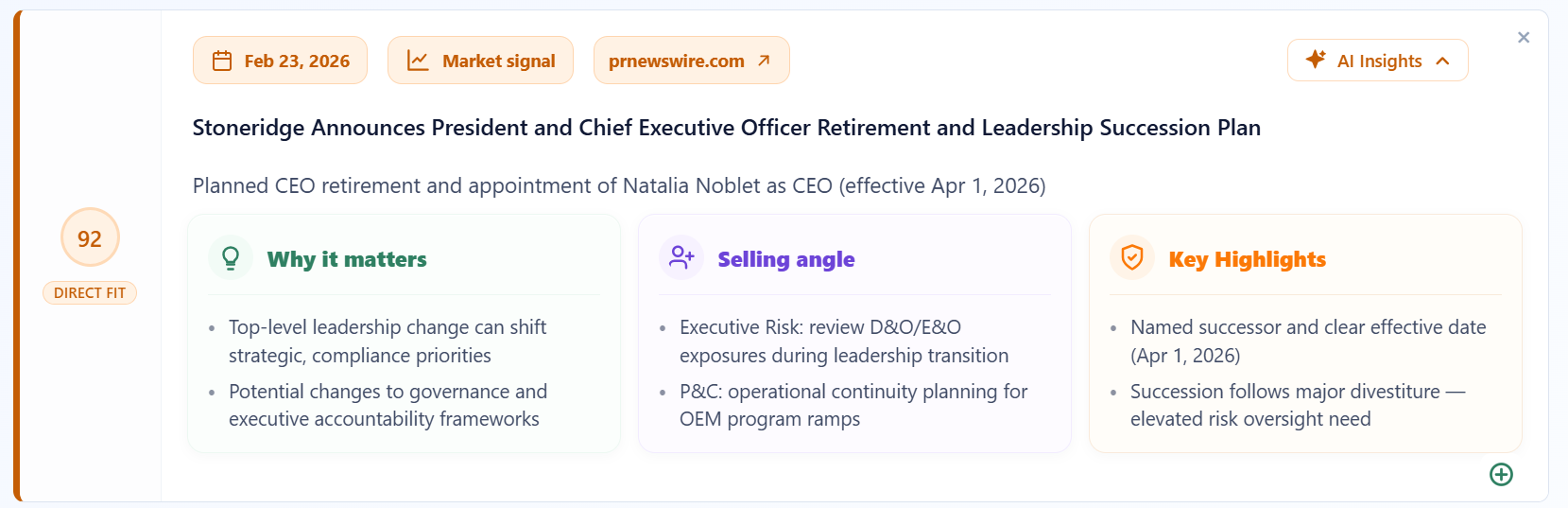
- Open a signal on the relevant account or opportunity and follow the original source link.
- Confirm the entity, location, date, and whether the event is proposed or completed.
- Read the relevance explanation against what your team sells. Dismiss an irrelevant signal rather than forcing an outreach angle.
- Check with the account owner before contacting anyone. Choose a next step that fits the relationship.
See how Pipeline Pulse works for installation, research inputs, and the data flow. This workflow adds public account context; it does not establish who has budget or confirm that a buying project exists.
6. Turn the news into an accountable follow-up task
Create a task related to the opportunity or account. The subject should say what to do, not merely repeat the headline. Include an owner, due date, source URL, and one question to validate.
| Task field | Example |
|---|---|
| Subject | Confirm reporting priorities for the announced acquisition |
| Regarding | The matched account or existing opportunity |
| Owner and due date | Account owner; the agreed follow-up date |
| Description | Source URL and publication date; transaction announced, not closed; ask which integration milestones affect reporting |
| Completion note | Record the answer and next step; update the opportunity only when buyer evidence changes |
Review task completion and relevant conversations with the team. A count of news cards alone does not show sales impact. If you want to measure signals-to-meetings or signals-to-opportunities, define the attribution rules and capture those outcomes explicitly.
Manager’s account-monitoring checklist
- Correct company and source verified?
- Event is recent enough and relevant to an offer we deliver?
- Territory and account ownership confirmed?
- Outreach asks a useful question without assuming an unconfirmed problem?
- Task has a related record, owner, due date, and recorded outcome?
Need examples of what to say? Use these sales trigger events and outreach email examples. Then review win rate and sales-cycle trends alongside your outreach activity; a news event alone does not establish buying intent.