Insurance relationships run on renewal cycles, but a client’s risk changes between renewals. A producer who hears about an acquisition from the client at the next renewal meeting has already missed the moment when coverage questions were most useful. Pipeline Pulse monitors public business events for the Accounts and Leads already in Dynamics 365 and puts the relevant ones on the record, with a source link, a plain-English explanation, and a suggested next step.
Business changes that can change coverage needs
Each event below is a reason to ask a question, not proof that a client needs a new policy. Pulse is configured to the lines your team writes, so a benefits practice and a commercial property team see different signals for the same company.
| Business change | Coverage conversation it may open | Verify with |
|---|---|---|
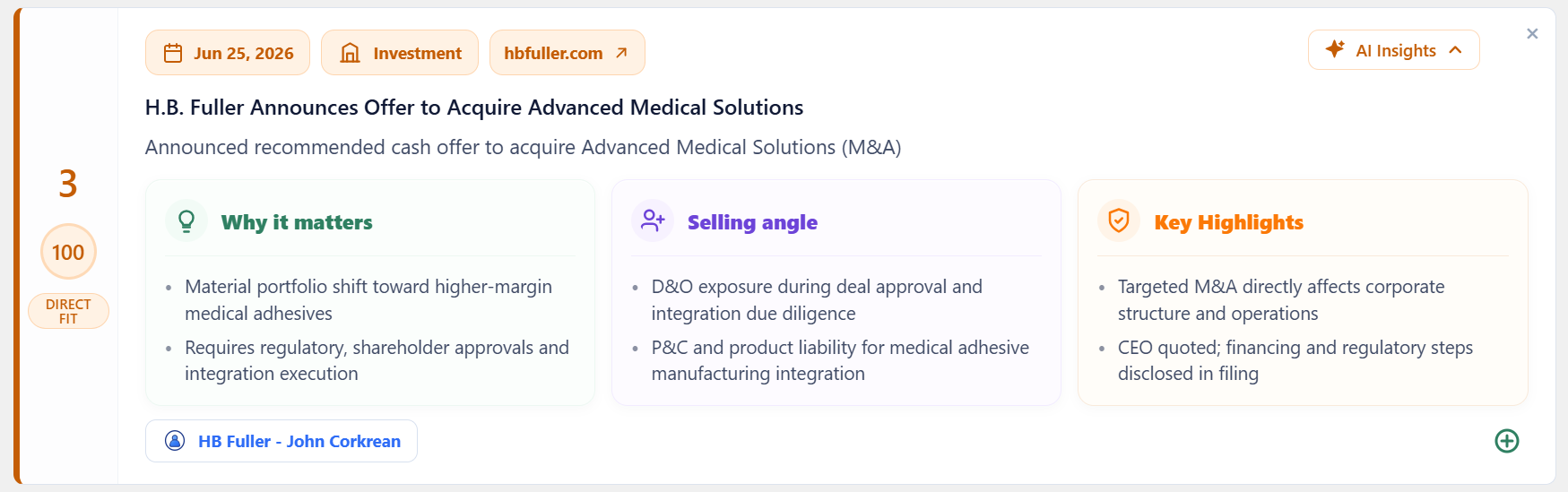
| Acquisition or merger announced | D&O, transaction and representations-and-warranties coverage, property and casualty schedules for acquired operations, product liability | Company announcement; SEC filing for public companies |
| CEO, CFO, or general counsel change | D&O review, key-person coverage, continuity planning during the transition | Company newsroom, leadership page, or filing |
| New facility, plant, or state expansion | Property, workers’ compensation, commercial auto, and new-state compliance requirements | Company or economic-development announcement |
| IPO filing or private equity transaction | Public-company D&O, transaction liability, changes in governance and reporting exposure | Registration statement or deal announcement |
| Cyber incident disclosed | Cyber coverage limits, incident response, business interruption, and vendor risk | Company disclosure or regulator notice |
| Lawsuit or regulatory action | D&O, E&O, employment practices liability | Court or regulator source |
Handle sensitive events carefully: cyber incidents, lawsuits, and regulatory actions affect real people. Link to the public source, separate allegations from findings, and open with a question rather than an assumption.
What a producer sees on the record
Every signal arrives as a card on the Account or Lead in Dynamics 365, so producers don’t switch tools or copy headlines into notes.
- The source: the original article or filing, linked and dated.
- Why it matters: a short explanation that ties the event to the lines your team writes.
- A selling angle: a suggested question or review to offer the client’s risk or finance team.
- A fit score: ranked by your configured triggers, industries, and territories, so the strongest signals rise to the top.
Built around how insurance teams sell
Between renewals, not just at renewal
Use Pulse signals alongside the renewal and expiration dates you already track in Dynamics 365. A mid-term acquisition or expansion gives the producer a relevant reason to call months before the renewal conversation, when there is still time to review schedules and limits.
Territory-aware for regional producers
Producers are usually organized by region or office. Pulse ranks in-territory events higher, so a plant opening in Ohio reaches the Midwest team first, and a same-named company in another state doesn’t create noise.
Prospects and existing clients
Pulse researches both Accounts and Leads. The same trigger can support cross-selling to an existing client or opening a conversation with a prospect who just changed.
Who it’s for
- Commercial property and casualty brokers and agencies using Dynamics 365
- Specialty and wholesale teams that follow transaction and management-liability events
- Carrier distribution and broker-relationship teams who want market context on key accounts
- Employee benefits consultants tracking workforce expansions, acquisitions, and leadership changes
Client data stays in your tenant
For external research, Pulse reads four fields on Accounts and Leads: name, website, city, and state. It does not read contacts, policies, premiums, claims, emails, or notes. Scores and insights are written back into your Dynamics 365 tenant, and nothing is retained on our side. Review the data model and security details.
Pulse works from public sources. It supports producers’ judgment and does not replace underwriting information, client disclosures, or licensed advice.